Skip to product information
1 of 6

Vintage Matchbook Poster – Editable Canva Template (DIY Personalised Photo Gift)

Vintage Matchbook Poster – Editable Canva Template (DIY Personalised Photo Gift)

Regular price $10.00 USD
Regular price Sale price $10.00 USD
Sale Sold out
Tax included. Shipping calculated at checkout.

✓ 4,000+ happy customers

  • Instant access
  • Edit in Canva
  • High-quality design

20% OFF with code: NOW20

How It Works

  1. Purchase and receive your PDF instantly
  2. Click the link to open in Canva (free account)
  3. Upload your photos and customize text
  4. Download and print at home or any print shop

Emailed within 1 business day Free revisions 4.9 from 4,050+ reviews

Your payment information is encrypted and secure


Description

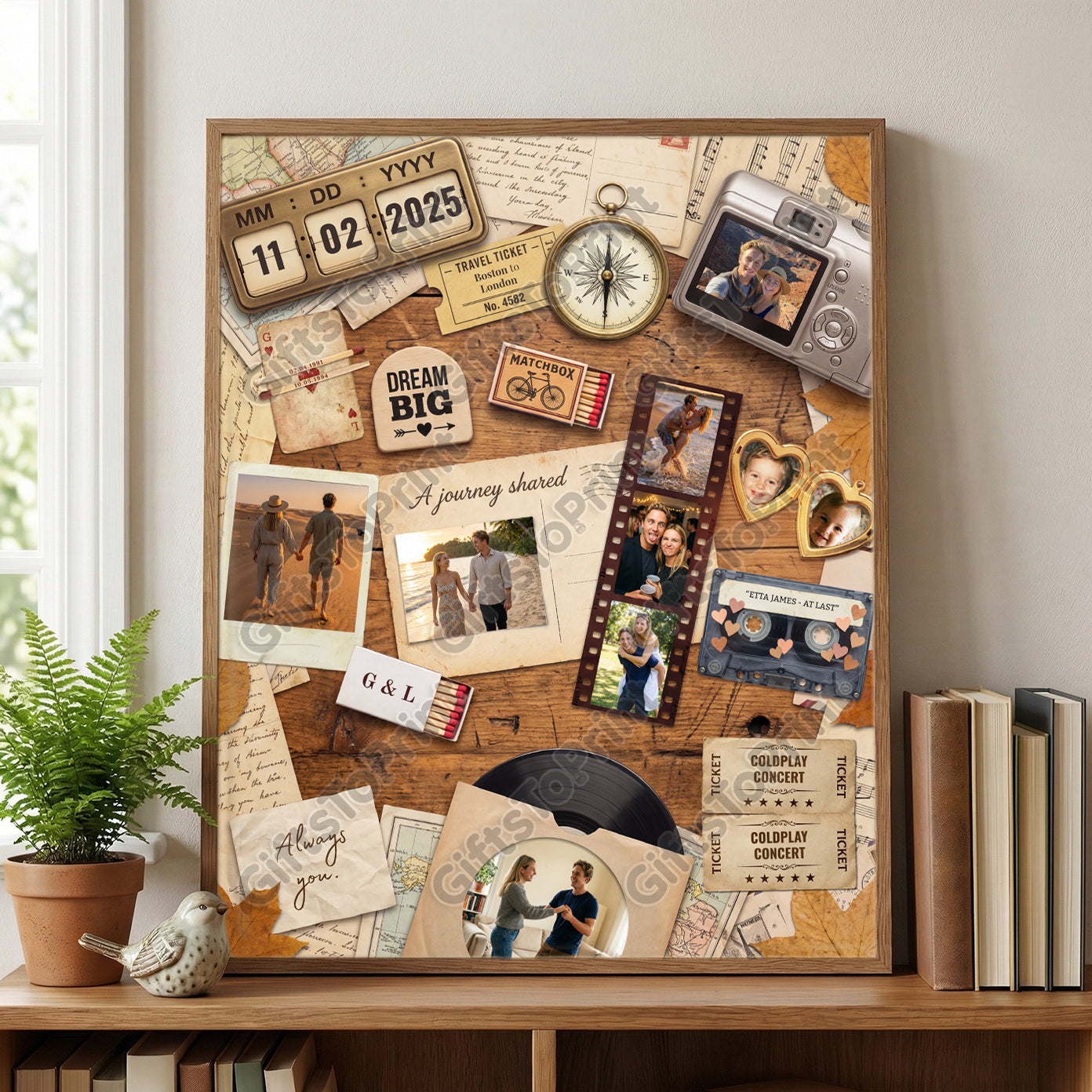
Create a stunning, nostalgic keepsake in minutes with this editable Vintage Matchbook Poster template.

Designed with a charming "travel scrapbook" aesthetic, this high-resolution template features realistic vintage elements: 90's cameras, old travel tickets, film strips, and matchboxes - all arranged on a rustic wood background. It is the perfect DIY personalised gift for anniversaries, weddings, travel memories, or Valentine's Day.

✨ Why You’ll Love It:

  • Fully Editable in Canva: Easily drag and drop your own photos into the film strips, polaroids, and lockets.
  • Customisable Text: Personalize the "Travel Ticket" destination, the "MM:DD:YYYY" date (perfect for anniversaries!), and the matchbox text.
  • Instant Digital Download: Get immediate access to your template link after purchase - no waiting for shipping.
  • High-Quality Print: Designed at high resolution, perfect for printing at home or via a professional print shop (poster size).
  • Sizes to Print: 18"x24", 16”x20”, 11”x14” or 8”x10” 

🎨 How It Works:

  1. Purchase & Download: You will receive a PDF file containing a direct link to the Canva template.
  2. Edit Online: Click the link to open the design in Canva (free or Pro account).
  3. Personalize: Upload 9 of your favourite couple or travel photos and drag them into the design. Type in your special dates, names, and other text.
  4. Print & Frame: Download your finished poster as a PDF Print and print it to frame. PDF Print gives you 300 DPI on a free Canva account; PNG and JPG downloads are only 96 DPI and will look soft at poster size.

📂 What’s Included:

  • 1 x PDF with direct access link to the editable Canva template.
  • Step-by-step instructions for adding photos and editing text.

Perfect For:
Dating Anniversary • Paper Wedding Anniversary Gifts (1st Anniversary) • Couple’s Travel Photo Collage • Long Distance Relationship Gifts • Valentine’s Day Scrapbook Posters • Vintage Aesthetic Wall Art


Please Note: This is a digital product only. No physical frame or poster will be shipped to you. You will need a free Canva account to edit the file.
FAQs

What is this product?

This is a fully editable Canva template. When you purchase, you'll receive instant access to a PDF containing a link to your template. Simply click the link, open in Canva (free account), and start customizing with your own photos and text.

What will I receive?

A PDF with a direct link to your editable Canva template, available immediately after purchase.

The template is one poster-sized design. Once you have personalised it, you print it at 8”x10”, 11”x14”, 16”x20” or 18”x24”.

It is a file, not a print. Nothing is posted.

Do I need a paid Canva account?

No. A free Canva account does everything you need, including the 300 DPI print-quality download. Just go to canva.com and create one if you do not have it already.

How do I edit the template?

Click the link in your PDF to open the template in Canva. From there you can:

► Upload your own photos by clicking on the image placeholders

► Edit any text by clicking and typing

► Change colours, fonts and more

When you are happy with it, download it — see the next question for the format to choose, because it matters.

Which format should I download?

Choose PDF Print. In Canva: Share → Download → File type: PDF Print. That gives you 300 DPI, which is what a print shop needs and what makes the poster look sharp.

Do not download PNG or JPG for printing. On a free Canva account those export at 96 DPI, which will look soft and pixelated at poster size. The higher-resolution image download is a Canva Pro feature.

PDF Print is not a Pro feature, so you do not need to pay Canva anything to get a print-quality file.

How do I print my file?

Once you've finished customizing and downloaded your design, you can print it:

► At home on your own printer

► At local print shops (Staples, Office Depot, Walgreens Photo, Costco)

► Through online printing services

We recommend printing on matte or satin photo paper for best results.

Important info

► This listing is for a digital product; no physical product will be shipped out.

► Because the template is delivered immediately on purchase, refunds or exchanges are not accepted once your order is placed.

► If you have any issues, please contact us and we'll help you out!